Vulnerability process
The Wilson Team vulnerability process is designed to allow us to squash vulnerabilities as fast as possible. It relies heavily on renovatebot raising constant patch MRs against our services, and as much as possible avoids time consuming investigation work.
How does it work?
Each week 2 developers are assigned to tackle vulnerability work. One of these will be assigned to tackle vulnerabilities, and the other to merge renovate bot MRs. Each is expected to raise an issue for this, this issue is a 1 day spike to work through as much of the process as possible.
Tackling vulnerabilities
The process is best explained by an activity flowchart:
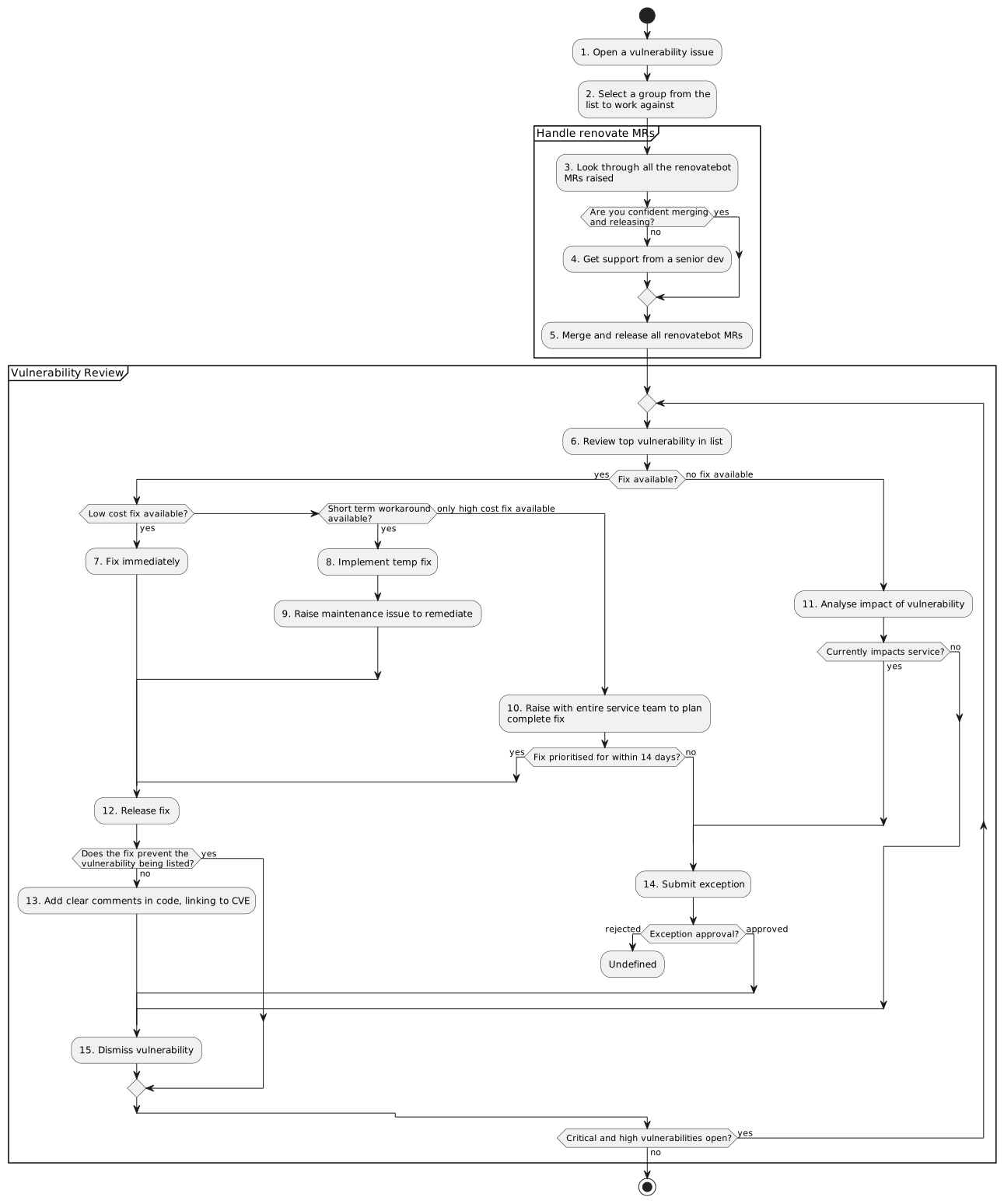
Activity diagram of the Wilson team vulnerability management process. (download)
This flowchart looks relatively complicated, but represents the process in complete detail. Developers are encouraged to group multiple vulnerability fixes together where appropriate, and generally use their common sense rather than exactly following operations in this flowchart.
More details
Many of the items in the activity flowchart are hopefully self-explanatory, but some additional detail for some items is provided here.
1. Open a vulnerability issue
Vulnerability issues are created in the IAM Administration project, using the "Vulnerabilities" template to populate the description.
This may require making some additional changes to ensure tests are passing and functionality is preserved. Ask for reviews as a priority in the teams channel.
Once renovatebot MRs have been merged, the changes must be released and deployed to all environments.
7. Fix immediately
If there is a renovatebot MR that may fix the issue, merge this immediately (or fix it if tests are) failing. You should be able to check if the change resolves the vulnerability by looking in the "Security" tab for the MR pipeline.
If there is no renovatebot MR available, raise an MR against the repository to resolve the vulnerability, and request a review as a priority in the teams channel.
8. Implement temp fix
As above, raise an MR to resolve and request a priority review.
10. Raise with entire service team to plan complete fix
Message the tech or team lead(s) or put a message in the teams channel flagging the problem.
11. Analyse impact of vulnerability
This will require explicit investigation by the developer to determine whether the vulnerable code or dependency is actually in use.
13. Add clear comments in code, linking to CVE
If a fix has been introduced that prevents the vulnerability from impacting a service, but the scanner is still marking it as a vulnerability, then the code that prevents impact must be clearly documented to prevent accidental removal and exposure to this vulnerability.
14. Submit exception
There is currently no defined process within UIS to submit exceptions. If this is necessary, raise with the team leads.
15. Dismiss vulnerability
To dismiss a vulnerability, raise an MR which:
- Adds the vulnerability to a
dismissed-vulnerabilities.ymlfile in the root of the repository.- Creates this file if it does not already exist.
- Populates all required fields (see documentation PENDING).
- The
dismiss_reasonshould be descriptive on the reason for dismissal, including notes on how the vulnerablity may impact the respository in the future if relevant. - The
review_dateshould typically be 3-6 months in the future.
- The
- Adds the pre-commit job PENDING if it is not already present in the pre-commit configuration.
- Adds the CI job PENDING to the CI configuration if it is not already present.
Tackling renovatebot MRs
The process is best explained by an activity flowchart:
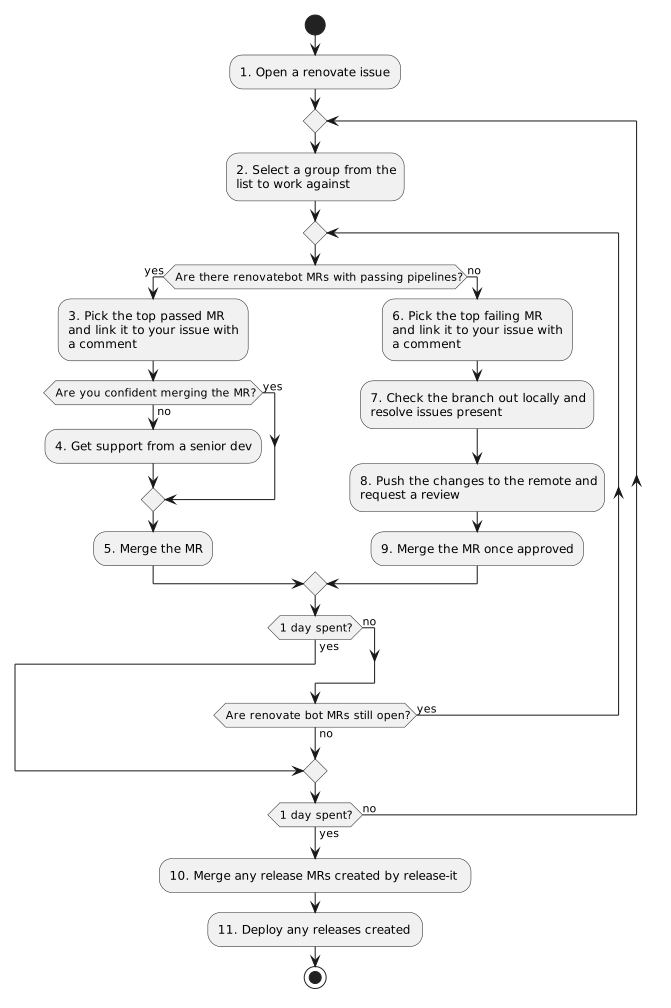
Activity diagram of the Wilson team renovatebot management process. (download)
Hopefully this diagram is self-explanatory, renovate issues are created in the IAM Administration project, using the "Renovatebot management" template to populate the description.
Dismissing vulnerabilities
To dismiss vulnerablities, we make use of the auto-dismiss functionality present in
gitlab.
A python tool is used to auto-populate this file from our own definition (stored in the root of
repositories) as part of the pre-commit process.
The pre-commit check takes the following actions:
- Check for changes to the
dismissed-vulnerabilities.ymlfile, and populates the.gitlab/security-policies/policy.ymlfile based on it, failing if any changes were made. - Check for any vulnerabilities which have a review date in the past, failing if any vulnerabilites are passed their review date.
If a vulnerability is passed its review date, the developer should assess if the vulnerability is now fixable (i.e. has an upstream dependency been patched to resolve this), if it is the entry should be removed from the auto-dismiss list. Note: the developer does not need to also apply this patch, this can be left for the next vulnerability process to resolve.
If the vulnerability remains unfixable, the developer should extend the review date according to their judgement, but 3-6 months is generally appropriate.
Alongside the pre-commit check, the python tool runs some extended checks in the CI. It takes the following additional actions:
- Checks for any vulnerabilities present in the
dismissed-vulnerabilities.ymlfile that are no longer present in the repository (either they have been fixed by a patch or this MR has removed the vulnerability), and failing if any dismissed vulnerabilities are now resolved. - Prints all the dismissed vulnerabilities out to the job output, for reviewers to check easily.
If the job fails due to a vulnerability no longer being present, the developer should remove this
entry in the dismissed-vulnerabilities.yml file.
Info
It might seem odd to fail the job on what, at first glance, seems like a benign event (the vulnerability being no longer present). However, it is important we try to keep the list of dismissed vulnerabilities as small as possible to avoid confusion and to allow for reviewers to check through the list quickly.
Technical implementation
The implementation of the vulnerability dismissing tool can be found PENDING.