Standard architecture diagrams
This page contains standard architecture diagrams which can be shared as part of documenting our services to external users. The diagrams follow the nomenclature and style used by the C4 model which is widely used in the industry. Each diagram can be downloaded in SVG format for embedding in other documentation although ideally some link back to this page should be preserved.
There is a 30 minute video which provides a good overview of the C4 model if you are unfamiliar with it.
Our standard architecture patterns evolve over time to align with industry best practice. Not all of our services follow these patterns. For greenfield projects, these diagrams reflect our current "paved path" of development.
Warning
The C4 style uses the word "container" to mean, roughly, a collection of interacting components which forms part of a wider system. This is different to the normal use of "container" within UIS DevOps to refer to a namespaced runtime environment used to execute a packaged application.
How the architecture is provisioned
The infrastructure shown in these diagrams is provisioned in two layers:
- The gcp-product-factory
creates the per-product "landing zone": a Google Cloud folder containing a meta project for
product-wide shared resources (the product's Artifact Registry, configuration bucket and DNS
zone) and one Google Cloud project per environment — production, staging and development by
default. It also creates the per-environment DNSSEC-signed Cloud DNS zones
(
{environment}.{product}.gcp.uis.cam.ac.uk), keylessterraform-deployservice accounts which GitLab CI jobs impersonate when deploying, billing budgets and alerting notification channels, centralised logging and monitoring, and Private Services Access so that Cloud SQL instances can optionally use private IP addresses. - The gcp-deploy-boilerplate template generates the terraform deployment which creates everything inside each environment project: the Cloud Run service, load balancer, Cloud SQL instance, application settings secret and monitoring resources. Each environment is a terraform workspace. Most of the resources shown in the diagrams below — including all of the load balancer components — are created by our standard gcp-cloud-run-app terraform module which the boilerplate wraps.
More detail can be found in the service infrastructure explanation and the how-to guide for bootstrapping a new product.
A typical web application
This is a container diagram showing a typical web application. Monitoring, alerting, metrics gathering and logging has not been shown. Some parts of the diagram are optional depending on the operational needs of the service.
Application configuration is loaded by the application at startup from a Secret Manager secret (with an object in the product's configuration bucket available as an overflow for non-sensitive settings). See how we deploy web applications for more detail.
Typically we only use a Cloud SQL instance to persist state. The application connects to it using Cloud Run's built-in Cloud SQL connection. By default the instance has a public IP address and relies on this Google-mediated connection for access; instances can instead be deployed with a private IP address only, in which case the Cloud Run service attaches to the project VPC network using direct VPC egress. Cloud SQL instances take automated daily backups with point-in-time recovery enabled and production instances are deployed with regional high availability. In addition, our centralised Data Backup Service exports every Cloud SQL database nightly to a Cloud Storage bucket in a dedicated backup project, independent of the instance's own backups. Cloud Storage buckets can also be enrolled, by label, for replication to an AWS S3 bucket to provide an off-cloud copy.
Every environment project contains the default VPC network, which the product factory hardens with firewall rules denying inbound SSH and RDP and prepares with a Private Services Access range for private-IP Cloud SQL. The Cloud Run application itself runs outside the VPC: its traffic is only routed through the network when it needs to reach a private-IP database or when a static egress IP is required.
Where database schema migrations must run in step with releases, the module can optionally create
a "pre-deploy" Cloud Run job which executes a command such as manage.py migrate before each new
revision of the application is deployed. See how to run database migrations when
deploying.
Some applications which deal with generated or user-uploaded binary content may also persist some state to a Cloud Storage bucket.
Note
Using Cloud Storage in this manner to persist state as opposed to configuration is uncommon but not unknown, and such a bucket is not created by our standard deployment. Cloud Storage is usually used in cases where:
- a significant amount of generated or user-uploaded binary content needs to be stored, or
- static binary content needs to be served to users of the application by means of HTTP redirects to signed URLs.
Use of Cloud Storage tends to be service-specific as will be any backup and data resilience methodology.
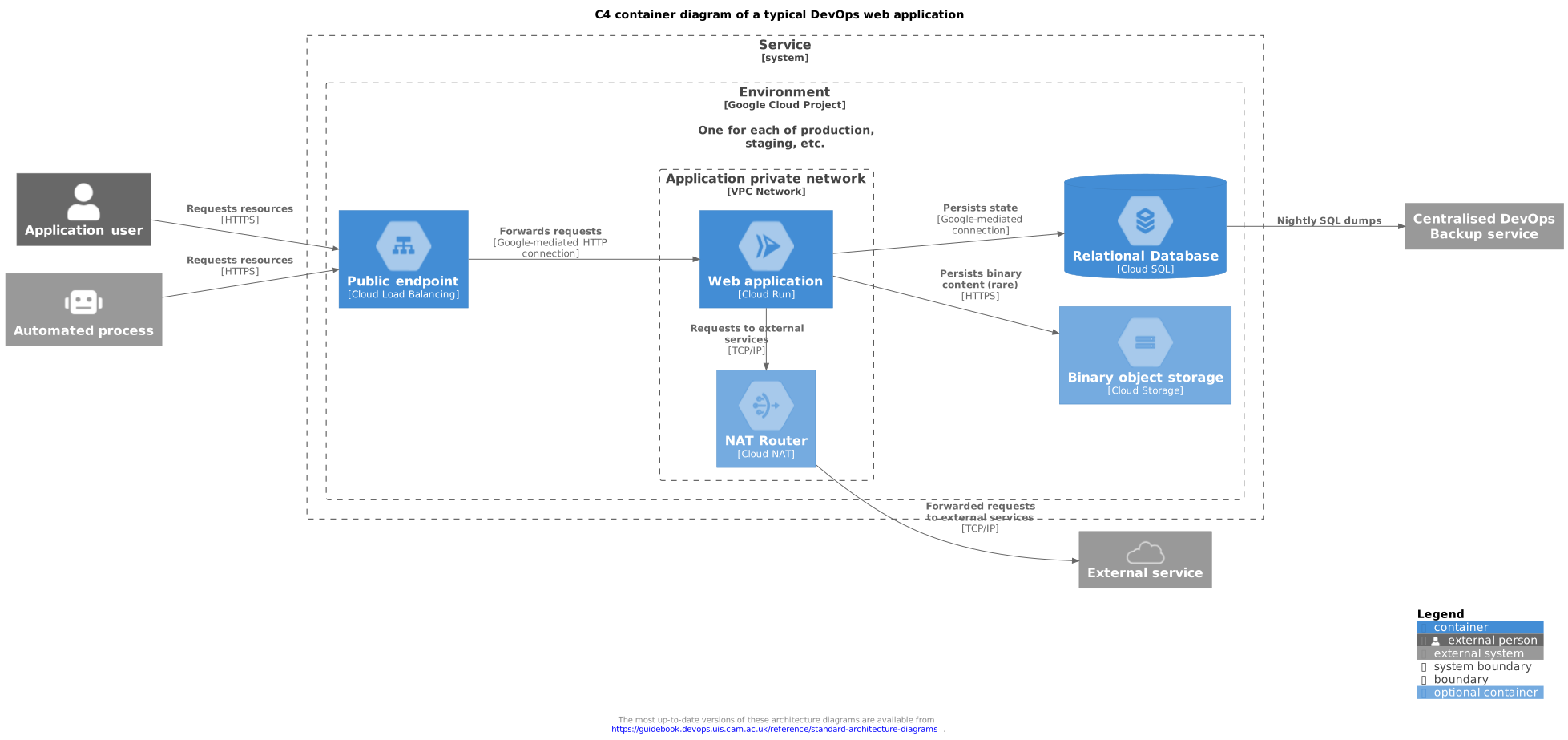
Simplified C4 container diagram of a typical web application deployment. (download)
Traffic ingress
This is a component diagram showing the traffic ingress for a typical web application in more detail. Monitoring, alerting, metrics gathering and logging has not been shown. Some parts of the diagram are optional depending on the operational needs of the service.
We use a Cloud Load Balancer frontend, forwarding rules and a serverless network endpoint group to handle incoming traffic. All of these resources are created by the gcp-cloud-run-app terraform module when its load balancer support is enabled, which is the default for boilerplate-generated deployments. When behind a load balancer, the Cloud Run service is configured to accept traffic from the load balancer only.
The service has a static ingress IP which can be resolved, indirectly, via a
{service}.apps.cam.ac.uk DNS record: an A record for the service is created in the
per-environment Cloud DNS zone (for example webapp.prod.{product}.gcp.uis.cam.ac.uk) and the
friendly .apps.cam.ac.uk name is a CNAME to it, managed separately in the University's IP
Register database. TLS termination and HTTP to HTTPS redirect is
handled at the load balancer frontend using a Google-managed certificate, with traffic being
forwarded to the backend over a dedicated Google-mediated HTTP connection.
Optionally, static and dynamic Cloud Armor rules may be included for DDoS and other abuse protection: the module accepts Cloud Armor security policies on the load balancer backend, although the policies themselves are defined per-service where the need arises. The module supports further ingress options for services which need them, including Identity-Aware Proxy, Cloud CDN caching of static assets, customer-supplied TLS certificates and SSL policies, and an IPv6 address.
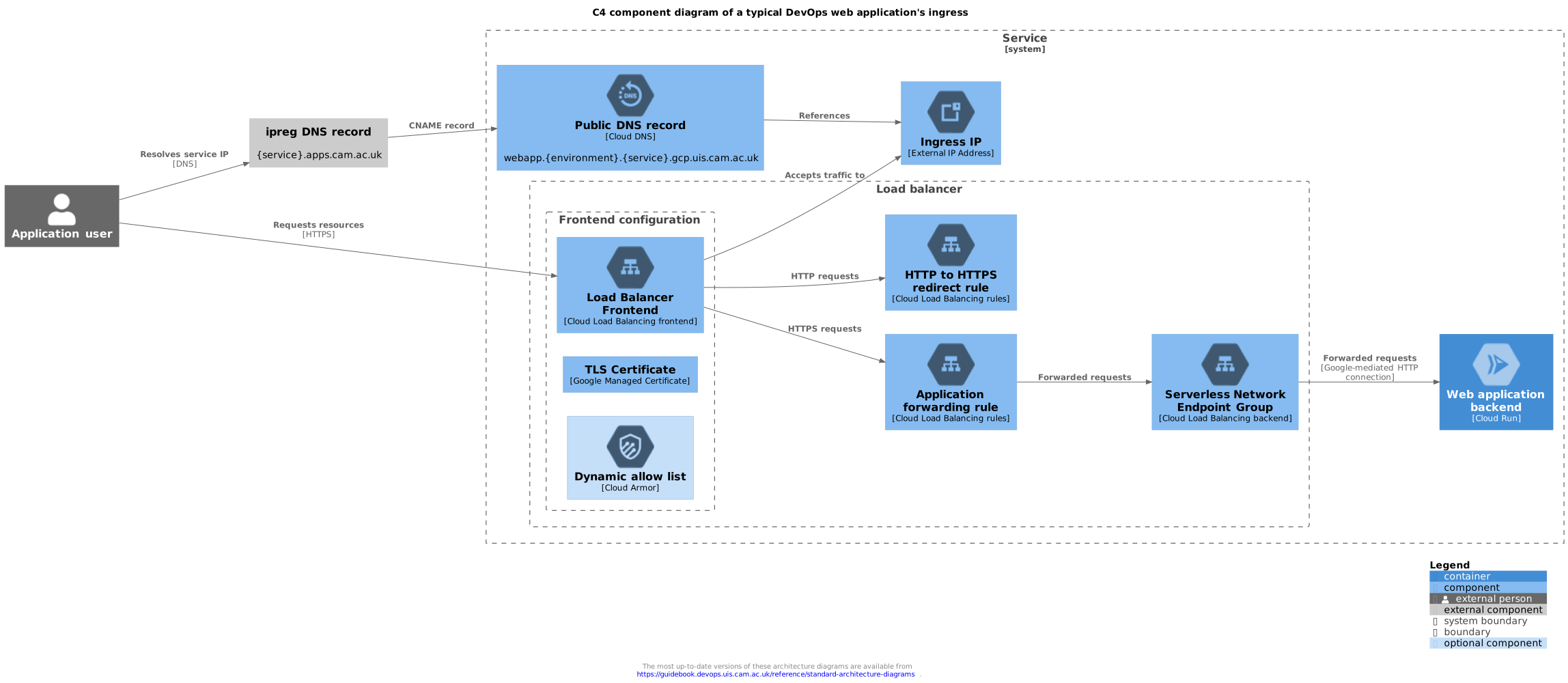
C4 component diagram of the ingress for a typical web application. (download)
Traffic egress for external service wishing to use IP allow listing
This is a component diagram showing the traffic egress for a typical web application in more detail for the case where an external service wishes to use IP allow listing. Monitoring, alerting, metrics gathering and logging has not been shown.
By default a Cloud Run application does not have a stable egress IP address: outbound requests
originate from Google's shared IP ranges. Where an external service insists on IP allow listing,
the gcp-cloud-run-app module's enable_static_egress_ip option (off by default) routes all of the
application's outbound traffic through a Serverless VPC Access connector on a dedicated subnet of
the project VPC network and a Cloud NAT router which uses a reserved static IP address, as shown
below. We strongly prefer active per-request authentication as the primary means of
service-to-service authentication but accept the use of IP allow listing as an additional layer
of protection.
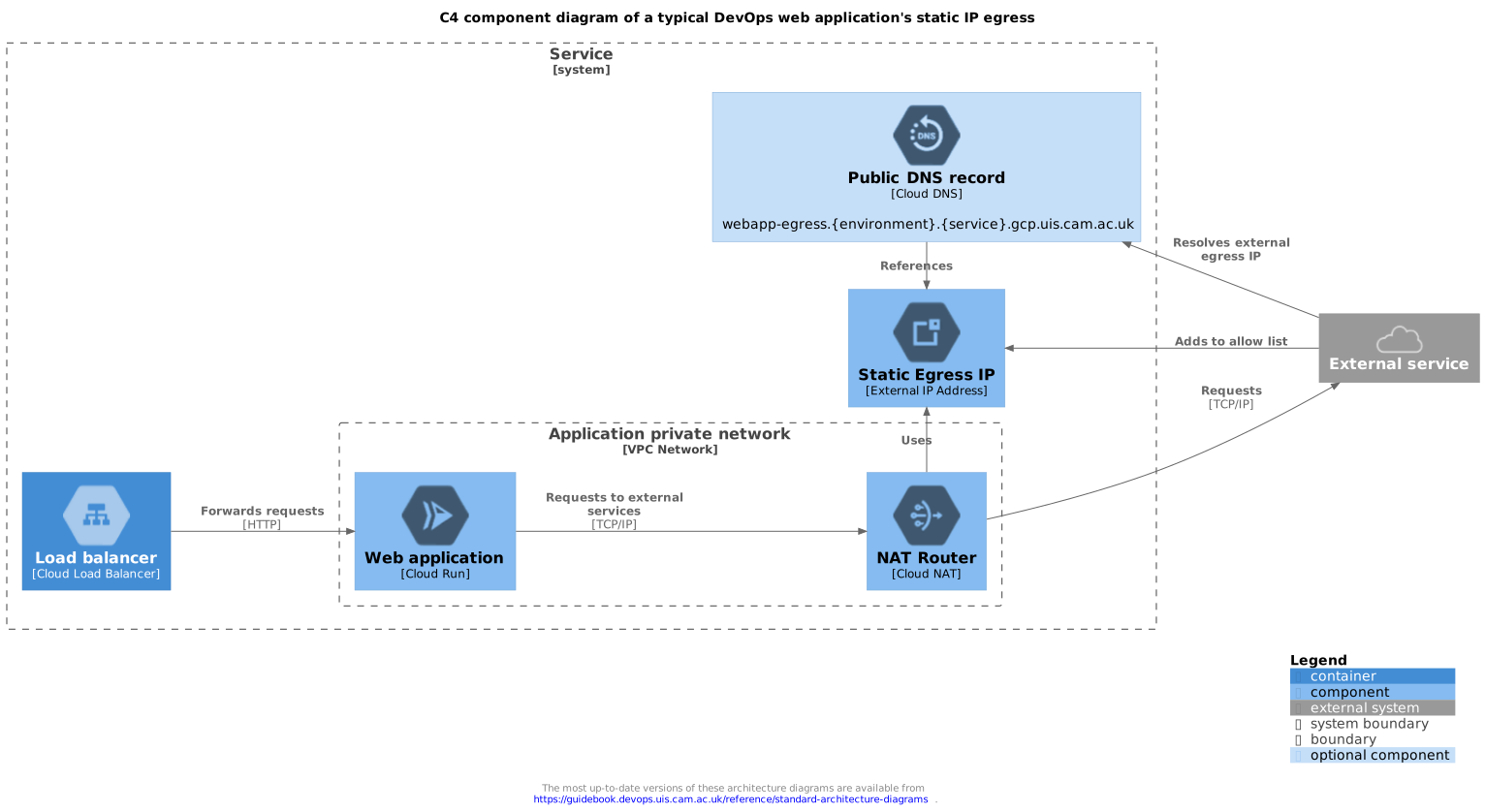
C4 component diagram of traffic egress of a web application using a static egress IP. (download)